
Your Microsoft bill is higher than it was six months ago, but no one can clearly explain why.
Having helped hundreds of clients reduce their Microsoft costs, often by as much as 30%, we’ve seen firsthand how Microsoft 365 and Azure expenses can increase over time. Licensing changes, growing cloud consumption, unused resources, and overlapping technology investments can all contribute to higher bills. The challenge is identifying what’s driving those costs and determining whether the additional spending is delivering value.
That’s why Finchloom offers The Reality Check: Microsoft 365 Licensing & Azure Consumption Assessment, a no-cost review designed to help you understand where your Microsoft dollars are going. In as little as one week, we help uncover hidden cost drivers, identify optimization opportunities, and provide a roadmap for improvement, without adding another project to your IT team’s workload.
While every environment is different, uncovering the root cause of rising Microsoft costs requires looking at several interconnected areas of the technology investment.
Understanding How Organizations Manage Microsoft Licenses and User Needs
It’s rare for a Microsoft environment to stay the same from the moment it was originally purchased and configured.
Employees join the company, change roles, and move between departments. New licenses are purchased to meet immediate needs. Azure resources are deployed for projects, applications, storage, testing, and business growth.
Individually, these changes may not create a noticeable increase. Over time, however, they can make Microsoft cost management increasingly difficult.
To effectively manage Microsoft licenses, organizations should review:
- Which licenses are currently assigned
- Whether those licenses match employee responsibilities
- Which Microsoft capabilities employees actually use
- Whether inactive accounts still have paid licenses
- Whether different employee groups require different licensing tiers
The focus is on giving each person the right capabilities without paying for features they don’t need.
A higher bill does not necessarily mean your organization is overspending. The additional cost may support legitimate business growth or new technology requirements. But without a clear view of Microsoft 365 licensing and Azure consumption, it is difficult to tell the difference between necessary investment and avoidable spending.
Microsoft Cost Management Requires Looking Beyond Microsoft
While licenses and Azure consumption are important pieces of the puzzle, they’re not always the reason costs are increasing. In many cases, your budget is spread across multiple platforms, subscriptions, and business tools that have been added to address specific challenges.
Usually, it starts with good intentions. A team member finds a tool that helps them work more efficiently, gets approval, and starts using it. Months or years later, we help them discover Microsoft 365 already included a similar capability.
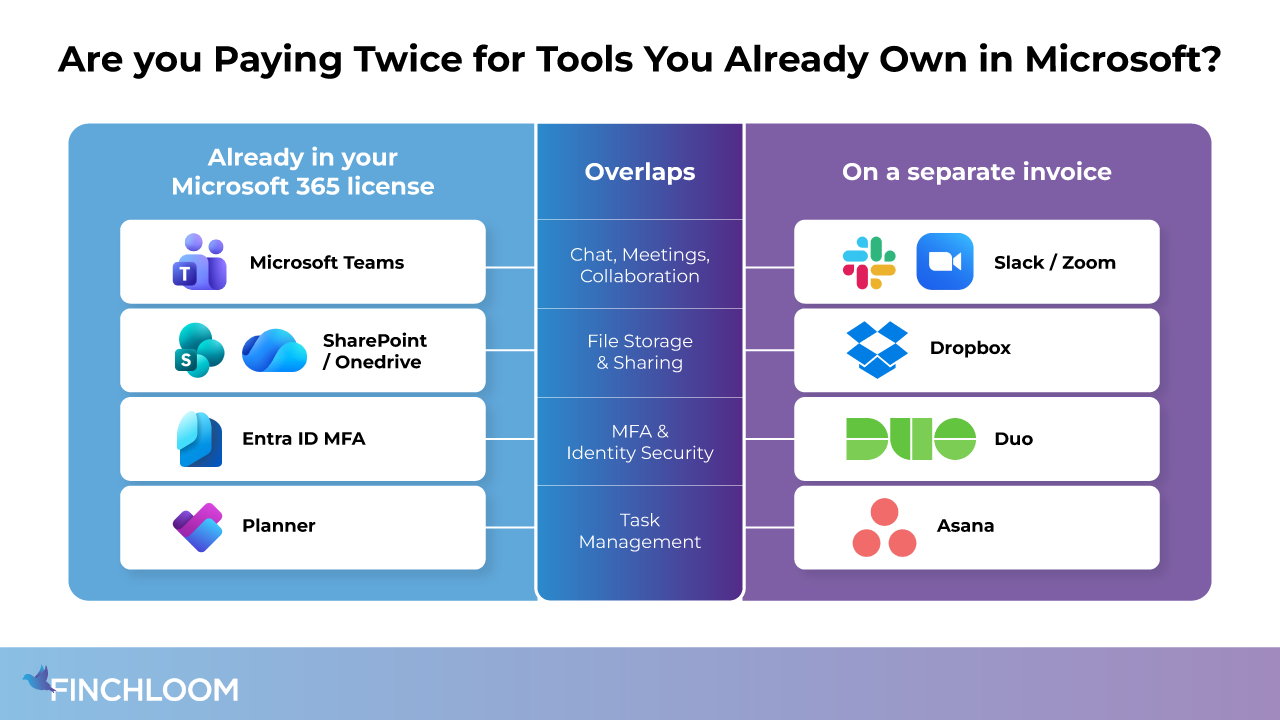
One of the most common cost optimization opportunities is identifying software purchases that overlap with capabilities already included in Microsoft 365.
That doesn’t mean every third-party application should be replaced. Some offer specialized functionality and continue to generate results. The important question we ask is whether you’re paying for multiple tools to achieve the same outcome. Identifying that overlap is an important part of effective Microsoft cost management because it helps ensure you’re getting the full value from the Microsoft licenses you’re already paying for.
What Should an Azure Cost Analysis Include?
If you’re trying to understand what’s driving Azure costs, the best place to start is with an Azure cost analysis.
Azure is designed to be flexible. Resources can be deployed quickly to support new projects, applications, testing environments, and changing business requirements. The challenge is keeping track of those resources once the original need has passed.
For example, a company may create a virtual machine and additional storage to support a software migration. Once the migration is complete, the project team moves on.
One forgotten resource may not have much impact. But what starts as a few dollars here and there can gradually turn into hundreds or even thousands of dollars in unnecessary Azure spending spread across multiple resources.
While Microsoft’s native Azure cost management tools can help identify spending trends and resource consumption, someone still needs to review the data, understand what each resource supports, and determine whether it’s still positively impacting the business.
A thorough Azure cost analysis should review:
- Changes in Azure consumption over time
- Resources that are no longer actively used
- Virtual machines that may be oversized
- Storage growth and retention requirements
- Old snapshots and backups
- Test and temporary environments
- Workloads that may benefit from an Azure Savings Plan
The goal is to understand whether costs are increasing because of legitimate business growth or because resources are consuming budget long after they’ve stopped producing results.
A Faster Way to Understand Your Microsoft Costs
If you’re like most IT leaders, understanding what’s driving Microsoft costs has probably been sitting on your to-do list for a while.
You know there could be opportunities to reduce spend or improve utilization, but investigating Microsoft licensing and Azure spending takes time that most teams simply don’t have.
That’s where The Reality Check: Microsoft 365 Licensing & Azure Consumption Assessment can help.
This no-cost assessment combines Microsoft license management and Azure cost analysis to help organizations identify what’s driving costs, uncover optimization opportunities, and determine whether they’re getting the full value of their Microsoft investment.
At the end of the assessment, you’ll receive:
- A clear view of where your Microsoft dollars are going
- Identified opportunities to reduce costs and improve utilization
- Prioritized recommendations based on business impact
- A practical roadmap for next steps
- A review session to discuss findings and recommendations
Whether the assessment confirms everything is properly aligned or uncovers opportunities for improvement, you’ll leave with the visibility needed to make more informed decisions about your Microsoft investment.
Book your no-cost Reality Check today.
Why Partner with Finchloom?
Finchloom is 100% focused on the Microsoft ecosystem, with expertise spanning Microsoft 365, Azure, licensing, security, productivity, and long-term technology planning. This broader perspective allows your team to consider more than the price of an individual license or Azure resource.
We believe your Microsoft investments should be a catalyst for growth, innovation, and operational excellence. Every recommendation is designed to help you maximize ROI while aligning technology decisions with your unique business objectives.