

You may have chosen GoDaddy for Microsoft 365 because it was a quick and easy way to get started with email, collaboration, and cloud productivity tools. But recently, you started noticing challenges. These challenges are often a sign that your Microsoft 365 environment has grown beyond the way it was originally set up.
We have a solution and it’s called a “GoDaddy defederation.” Read on to learn what GoDaddy defederation is, how to know when you’re ready, how the process works, and what to look for when choosing the right provider.
Why Is GoDaddy Different from a Standard Microsoft 365 Tenant?
Before we talk about GoDaddy defederation, it helps to understand what a Microsoft 365 tenant actually is.
Think of your Microsoft 365 tenant as your organization’s dedicated home within Microsoft’s cloud. It contains your users, email accounts, files, Teams environments, SharePoint sites, security settings, and the configurations that keep everything connected and running smoothly.
If you purchased Microsoft 365 through GoDaddy, your tenant was likely set up with additional management and identity configurations that differ from a standard Microsoft 365 environment purchased directly from Microsoft or through a Microsoft Cloud Solution Provider (CSP).
That setup is designed to make getting started simple. But as your organization grows, your technology needs to grow with it. When you’re investing in stronger security, adopting tools like Microsoft Copilot, or planning for future growth, having direct control of your Microsoft 365 tenant becomes increasingly important.
So how do you know when you’ve outgrown a GoDaddy-managed environment?
Here are seven common signs it may be time to consider removing GoDaddy from your Microsoft 365 tenant:
Sign #1: You’re Constantly Running Into Administrative Roadblocks
One of the most common frustrations organizations experience is realizing they don’t have the level of administrative access they expected. Even simple changes can require extra steps, with certain settings unavailable and routine tasks becoming more complicated than they should be. Instead of managing your Microsoft 365 environment directly, you may find yourself relying on GoDaddy for administrative requests which makes simple updates inefficient.
Sign #2: Your IT Provider Keeps Running Into GoDaddy Restrictions
Sometimes, the first person to notice the problem isn’t you. It’s the person trying to help you fix it. Your IT provider, internal IT team, security consultant, or Microsoft partner may start running into roadblocks when they try to make changes within your Microsoft 365 environment. Before you know it, simple tasks require unnecessary workarounds. If your technology partners regularly mention GoDaddy restrictions or limitations, it may be a sign that your Microsoft 365 environment has outgrown the way it was originally set up.
Sign #3: You Want to Take Advantage of More Microsoft Capabilities
Microsoft is constantly expanding what’s possible within its ecosystem. The more you rely on Microsoft 365 to run your business, the more valuable it is to have ownership to make changes when you need them.
Many businesses start exploring GoDaddy defederation when they want to:
- Strengthen security and compliance
- Expand their use of SharePoint and collaboration tools
- Prepare for Microsoft Copilot and AI initiatives
At the end of the day, Microsoft 365 is designed to grow with your business. Having direct tenant ownership ensures your technology can keep up with where you’re headed.
Sign #4: Your Business Has Outgrown Its Original Setup
When we talk with organizations about their Microsoft 365 journey, we often hear a similar story: GoDaddy was a great fit when the business was getting started.
But businesses don’t stay the same.
As organizations grow, their technology needs to evolve. They may begin working with specialized IT providers, strengthening security, adopting new Microsoft solutions, or looking for more flexibility in how their Microsoft 365 environment is managed. At that point, many organizations find that working directly with Microsoft and trusted technology partners makes more sense than relying on an intermediary like GoDaddy.
Sign #5: Managing Microsoft 365 Licensing Is More Difficult Than It Should Be
Adding users, upgrading licenses, assigning Microsoft services, or adjusting subscriptions can become frustrating when you don’t have the flexibility and control you need.
During a recent project, licensing was one of the first areas we focused on. Before making any changes, we reviewed the existing setup, identified what needed to be adjusted, and planned for what the organization would need moving forward.
After the transition was complete, the customer shared that managing licenses and adjusting Microsoft services had become “a piece of cake.” That’s exactly what you want from your Microsoft 365 environment. It should make it easier to adapt, grow, and take advantage of new opportunities.
Sign #6: Security and Business Continuity Have Become Bigger Priorities
Security naturally becomes a bigger priority when your business grows. What worked when your organization was smaller may not provide the level of visibility you need today.
You may find yourself looking for stronger governance, better insight into your Microsoft 365 environment, faster response capabilities, or closer collaboration with your IT and security partners.
Many organizations reach a point where a GoDaddy-managed environment no longer provides the control they need. Moving to direct Microsoft 365 management allows them to work with their preferred partners, implement tools, and make changes with greater confidence.
Sign #7: You’re Planning for What’s Next
Sometimes the sign that it’s time for a change is a goal you want to achieve tomorrow.
New opportunities often bring new technology needs. You may be preparing for business expansion or launching AI initiatives. At that point, you may realize your current Microsoft 365 setup doesn’t give you the flexibility you need to move as quickly as you’d like.
Having direct control of your Microsoft 365 tenant enables you and your team to make strategic technology decisions on your own terms and continue evolving your environment as your business grows.
What Is GoDaddy Defederation?
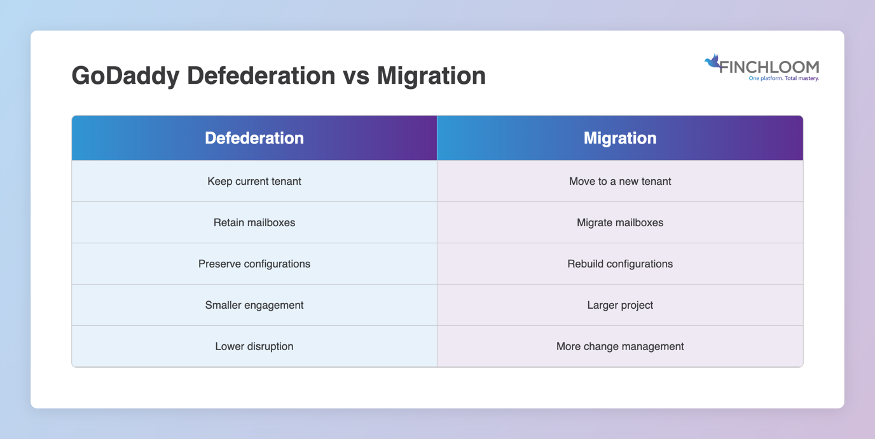
Now you are probably wondering: “How can I remove GoDaddy from Microsoft 365 without migrating everything?”
Well, that’s what GoDaddy Defederation is.
GoDaddy defederation is the process of removing GoDaddy’s management layer from your Microsoft 365 tenant so you can take back direct administrative control without moving users, rebuilding email systems, or creating a completely new tenant.
That means organizations may be able to retain:
- User accounts
- Email addresses
- Exchange Online mailboxes
- Microsoft Teams data
- SharePoint sites
- OneDrive files
- Existing Microsoft 365 workloads
The first step is understanding how your Microsoft 365 environment is configured. Every tenant is different, so it’s important to assess your setup before making any changes. The good news is that many organizations can regain full control of their tenant without taking on a large, disruptive migration project.
How Does the GoDaddy Defederation Process Work?
While every tenant is unique, most successful GoDaddy defederation projects follow a structured process.
1. Environment Assessment
The current Microsoft 365 environment is reviewed to understand:
- Licensing
- User accounts
- Identity configuration
- Security settings
- Existing Microsoft services
This ensures potential risks are identified before any changes are made.
2. Identity Transition
Identity management is transitioned back to Microsoft’s native identity platform, Microsoft Entra ID. This is one of the most important components of the process because authentication and access controls must remain stable for users.
3. Administrative Control Restoration
Administrative ownership and permissions are re-established so the organization can directly manage its Microsoft 365 tenant. This often includes validating administrator accounts and confirming access to core Microsoft services.
4. Validation and Testing
Email, Teams, SharePoint, licenses, and user access are validated to confirm everything is functioning as expected. The result is a tenant that maintains business continuity while giving you greater control over its environment.
How Do You Choose a GoDaddy Defederation Provider?
Not all Microsoft partners have experience with GoDaddy defederation projects.
When evaluating providers, consider the following:
- Microsoft Expertise: Look for a partner with deep Microsoft 365, Entra ID, and tenant administration experience.
- Documented Process: A proven methodology reduces risk and helps ensure a smooth transition.
- Minimal Business Disruption: The provider should prioritize maintaining user productivity and business continuity.
- Ongoing Support: Many organizations benefit from continued guidance after the engagement is complete.
- Experience with GoDaddy Environments: GoDaddy-managed Microsoft 365 tenants present unique challenges that require experience and planning.
Choosing the right provider can make a significant difference in project success.
Why Organizations Choose Finchloom for GoDaddy Defederation
If you’re considering GoDaddy defederation, the last thing you want is a complicated technology initiative that creates more headaches than solutions. That’s where having the right partner makes all the difference.
Finchloom makes taking back control of your Microsoft 365 environment quick and easy, most often in a day. The focus is on preserving what already works while removing the limitations that are holding your organization back.
Contact us now to book a free discovery call.